
Good Morning/Afternoon/Evening/Night CTFers! I hope you’re having a nice day. I am 5h1kh4r, a fellow CTFer and my team “BlitzHack” stood 11th in the H7CTF.

I’ll be including the following challs in this writeup:
Crypto:
1. Hertz
2. 勝つ
3. Rated R
Reversing:
1. Eich
2. Scrambled Pathways
3. Exponential Enigma
4. Horcrux
5. Bitwise Mystery
Web:
1. No Paste
Hardware:
1. Layered Circuits
Also, I’ll be uploading all the chall files for these challs on my google drive and attach links here so that it is easy for anyone who doesn’t have access to the chall server to still try out the challs. Here is the link to the drive:
https://drive.google.com/drive/folders/12V%5FgloLPDTknQONJVLWW8aTEFYTsACRo?usp=sharing
Crypto
- Hertz:
Description:
“Machines take me by suprise with great frequency” — Alan Turing
Files: doom, cipher
Solution:
For this challenge, we are given a doom file and a ciphertext file. We try to open the ciphertext file and see there are some weird symbols in there and they don’t seem to resemble anything.
⥾⋄⥽⥾≧⋄⥽ ≧⨂⊛ ⥮⊖♺⊝⥽ ⋑⦿⥽ ⥽⨂⊕⟆⟒≧ ⋉⊘ ⊕⨂⊝⥽⥮⋑⊕⟆≧⋑⊕⨂⟆ ⨂⥽⋓ ⊚⥫⨂✷⋑⊕⊖⨂⥮. ✵-⟒≧⋄⨅⥽⊛ ♢⊕⨂⊛⊕⨂⟆⥮ ⥮⊖⊖⨂ ⊕⨂ 7 ≧⨂⥮⋓⥽⋄⥮ ⋉⥽✷⨅⊖⨂. ⦿7✷⋑♢{✷⋄⊘⥾7!✷⟒⊘$⋑3⋄1⥽⥮4⋄⥽⟒3@⨂7_70⋉3_✷⋄4✷⨅3⊛!}
Now let us try to open the doom file and we find something, it is a lambda function which is base64 decoding and then decompressing the code and at last executing it. The base64 string is very large which now implies that the string has been encoded multiple times and not only once. So I write a code which does the exact same thing as the lambda function, except executing the code part as when I try to run the code in the doom file, I get the number 26 which doesn’t seem to make any sense. The code I wrote decodes the base64 string once and then I have to copy the new encoded string from the output and paste it in the python code again, I know this could’ve been better with some regex or something but I was I don’t know super lazy or not in the state of mind of implementing something like that but anyways, I am attaching the last iteration of the base64 decoding and decompressing code and here it is:
```import zlib
import base64
# Original encoded string
encoded_data = b’Vd0cWoQPj1WT0kFWO5WOTVmb1kWW5lTeMZTTINGMShUYjoQKpQHe0hiblxGK05WayBnCis6pijpiiXLniP5ii3piivapiH5ii7apiT4iirYii7bpibpiiLIqiL5nirbmiXIqirpiiXpii/rpib4niLami3bpivpiifLnin4iifaiiLCI9ACd4R3/6BQhBwJe’
# Reverse the encoded string
reversed_data = encoded_data[::-1]
# Decode from base64
decoded_data = base64.b64decode(reversed_data)
# Decompress the data
decompressed_data = zlib.decompress(decoded_data)
# Print the decompressed data
print(decompressed_data.decode())
import zlib
import base64
Original encoded string
encoded_data = b’Vd0cWoQPj1WT0kFWO5WOTVmb1kWW5lTeMZTTINGMShUYjoQKpQHe0hiblxGK05WayBnCis6pijpiiXLniP5ii3piivapiH5ii7apiT4iirYii7bpibpiiLIqiL5nirbmiXIqirpiiXpii/rpib4niLami3bpivpiifLnin4iifaiiLCI9ACd4R3/6BQhBwJe’
Reverse the encoded string
reversed_data = encoded_data[::-1]
Decode from base64
decoded_data = base64.b64decode(reversed_data)
Decompress the data
decompressed_data = zlib.decompress(decoded_data)
Print the decompressed data
print(decompressed_data.decode())
And once you run this code, you will get the following output:
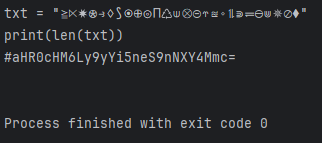
Source: Pycharm
txt = “≧⋉✷⊛⥽♢⟆⦿⊕⊚⨅♺⟒⨂⊖⥾≊⋄⥮⋑⥫⊝⋓✵⊘⧫”
print(len(txt))
#aHR0cHM6Ly9yYi5neS9nNXY4Mmc=
At first instinct I decode the base64 encoded text and get a URL
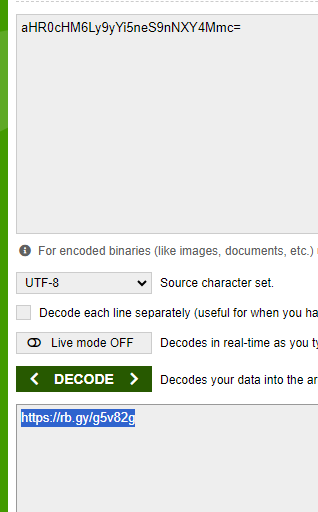
https://rb.gy/g5v82g And guess what? It’s a rickroll

I cursed the author at this moment, it was so frustrating and reminds me of the time when I had made a similar “troll” challenge for the ctf I had hosted, yea I got a taste of my own medicine (Trust me it’s bitter). Now moving on from the rickroll, we can analyze the rest of the code and see that there is a txt variable and the symbols in it kind of resemble the symbols we are given in the ciphertext and remember the output “26” when we run the original lambda function? Right it is the length of this txt variable. At this point, 26 should click in your brain that it’s the English alphabet (I swear if you don’t recognize this, you need to get yourself checked) and using each symbol in order and replacing them with a-z and using this as the reference table for decoding the ciphertext, I wrote a code and it decodes the ciphertext and we get the flag:
```# Given mapping of symbols to letters (a-z)
symbol_to_letter = {
‘≧’: ‘a’, ‘⋉’: ‘b’, ‘✷’: ‘c’, ‘⊛’: ‘d’, ‘⥽’: ‘e’, ‘♢’: ‘f’,
‘⟆’: ‘g’, ‘⦿’: ‘h’, ‘⊕’: ‘i’, ‘⊚’: ‘j’, ‘⨅’: ‘k’, ‘♺’: ‘l’,
‘⟒’: ‘m’, ‘⨂’: ’n’, ‘⊖’: ‘o’, ‘⥾’: ‘p’, ‘≊’: ‘q’, ‘⋄’: ‘r’,
‘⥮’: ‘s’, ‘⋑’: ‘t’, ‘⥫’: ‘u’, ‘⊝’: ‘v’, ‘⋓’: ‘w’, ‘✵’: ‘x’,
‘⊘’: ‘y’, ‘⧫’: ‘z’
}
# The ciphertext to decrypt
ciphertext = (
“⥾⋄⥽⥾≧⋄⥽ ≧⨂⊛ ⥮⊖♺⊝⥽ ⋑⦿⥽ ⥽⨂⊕⟆⟒≧ “
“⋉⊘ ⊕⨂⊝⥽⥮⋑⊕⟆≧⋑⊕⨂⟆ ⨂⥽⋓ ⊚⥫⨂✷⋑⊕⊖⨂⥮. “
“✵-⟒≧⋄⨅⥽⊛ ♢⊕⨂⊛⊕⨂⟆⥮ ⥮⊖⊖⨂ ⊕⨂ 7 ≧⨂⥮⋓⥽⋄⥮ “
“⋉⥽✷⨅⊖⨂. ⦿7✷⋑♢{✷⋄⊘⥾7!✷_⟒⊘$⋑3⋄1⥽⥮_4⋄⥽_⟒3@⨂7_70_⋉3_✷⋄4✷⨅3⊛!}”
)
# Decrypt the ciphertext
decrypted_text = ‘’.join(symbol_to_letter.get(char, char) for char in ciphertext)
# Output the decrypted text
print(decrypted_text)
Given mapping of symbols to letters (a-z)
symbol_to_letter = {
‘≧’: ‘a’, ‘⋉’: ‘b’, ‘✷’: ‘c’, ‘⊛’: ‘d’, ‘⥽’: ‘e’, ‘♢’: ‘f’,
‘⟆’: ‘g’, ‘⦿’: ‘h’, ‘⊕’: ‘i’, ‘⊚’: ‘j’, ‘⨅’: ‘k’, ‘♺’: ‘l’,
‘⟒’: ‘m’, ‘⨂’: ‘n’, ‘⊖’: ‘o’, ‘⥾’: ‘p’, ‘≊’: ‘q’, ‘⋄’: ‘r’,
‘⥮’: ‘s’, ‘⋑’: ‘t’, ‘⥫’: ‘u’, ‘⊝’: ‘v’, ‘⋓’: ‘w’, ‘✵’: ‘x’,
‘⊘’: ‘y’, ‘⧫’: ‘z’
}
The ciphertext to decrypt
ciphertext = (
“⥾⋄⥽⥾≧⋄⥽ ≧⨂⊛ ⥮⊖♺⊝⥽ ⋑⦿⥽ ⥽⨂⊕⟆⟒≧ “
“⋉⊘ ⊕⨂⊝⥽⥮⋑⊕⟆≧⋑⊕⨂⟆ ⨂⥽⋓ ⊚⥫⨂✷⋑⊕⊖⨂⥮. “
“✵-⟒≧⋄⨅⥽⊛ ♢⊕⨂⊛⊕⨂⟆⥮ ⥮⊖⊖⨂ ⊕⨂ 7 ≧⨂⥮⋓⥽⋄⥮ “
“⋉⥽✷⨅⊖⨂. ⦿7✷⋑♢{✷⋄⊘⥾7!✷⟒⊘$⋑3⋄1⥽⥮4⋄⥽⟒3@⨂7_70⋉3_✷⋄4✷⨅3⊛!}”
)
Decrypt the ciphertext
decrypted_text = ‘’.join(symbol_to_letter.get(char, char) for char in ciphertext)
Output the decrypted text
print(decrypted_text)
Run the code for yourself and get the flag!
2. 勝つ
Description:
I choose a lazy person to do a hard job. Because a lazy person will find an easy way to do it.
Files: topsecret.zip
Solution:
We try to open the zip but find that it’s password-protected. We can use johntheripper to crack the password of the zip file or you can try the more “hard-work” oriented approach of guessing passwords. Nonetheless I ran john on the zip file using the following commands:
zip2john topsecret.zip > hashhhhh
john -w=rockyou.txt hash.h
john hash.h –show
And the output of the last command should show you the following:

This shows that the password for the zipfile is 1friends1, yea you could’ve never guessed it lmao. Now using this password to open the zip file you can extract it’s contents and you can open and analyze each file and take your own sweet time. But I will write down the path to the important files here for the ones who are in a rush:
topsecret\SYSVOL\domain\Policies{a28b6bac-b6ac-4ad2-9f9a-fec32cc859e9}\Machine\Preferences\Groups\Groups.xml
topsecret\SYSVOL\domain\Policies{a28b6bac-b6ac-4ad2-9f9a-fec32cc859e9}\Machine\User\Admin.xml
topsecret\SYSVOL\domain\Policies{a28b6bac-b6ac-4ad2-9f9a-fec32cc859e9}\Machine\User\Support.xml
The first file, that is Groups.xml contains a hex text and don’t confuse it for a hash. The other two files that is Admin.xml and Support.xml contain hashes, which we have to crack again using johntheripper so you can just save the hashes in one file and crack them using john. Use the following commands in linux to do so:
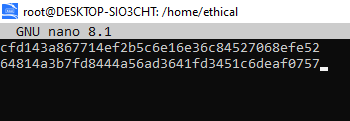
inside nano
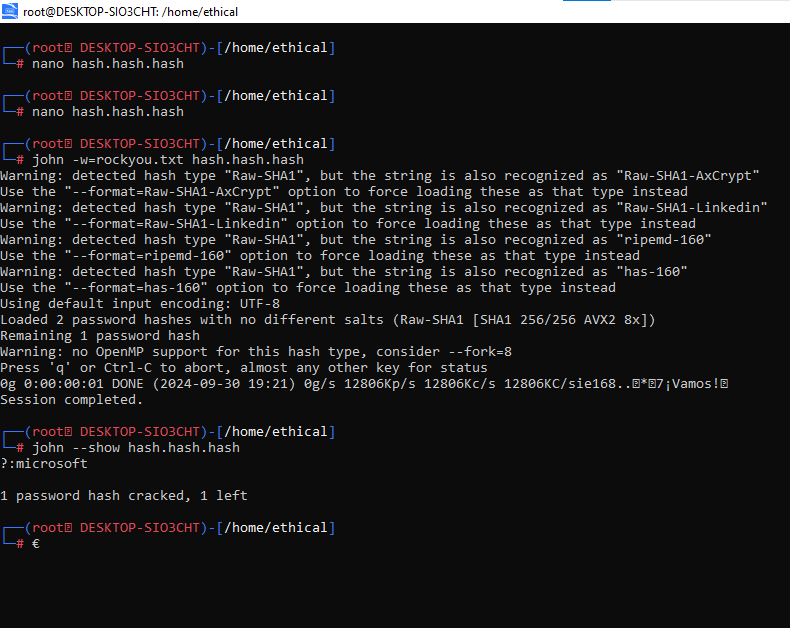
So now we are able to crack one hash, doesn’t matter which one and the cracked password is “microsoft”. Now using this microsoft keyword and also the cPassword field from Groups.xml you should be able to make out that it is talking about gpp keys and passwords and once microsoft had accidentally leaked their key and the key is here https://learn.microsoft.com/en-us/openspecs/windows%5Fprotocols/ms-gppref/2c15cbf0-f086-4c74-8b70-1f2fa45dd4be?redirectedfrom=MSDN using this key, you can decrypt the encrypted cipher text using aes (ecb mode) in cyberchef like the follows:
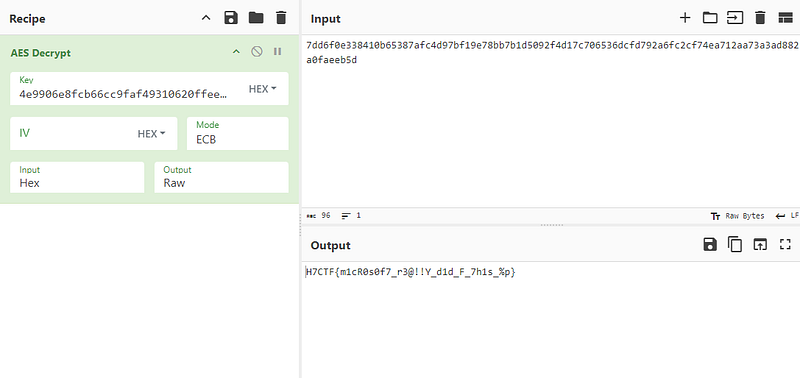
And there you have your flag.
3. Rated R:
Description:
“Enjoy the phase, as the journey is far more enjoyable than the destination.” — SSR
Files: cert.pem, exploit, cipher
This was the challenge that I think I could’ve solved during the CTF but I didn’t because I was dumb enough to think that the month in which the CTF was being conducted was not september and july (LoL, please laugh). Anyways, my solution for this chall could be a bit off or you might say that “not intended”. Actually it was harder than the intended solution but anyways. At first I thought it’s a RSA challenge because I saw the cert.pem file but when I decoded the cert, I got the values for RSA but nothing from there. But I missed a crucial detail which was the date and I’ll explain how this is important later.
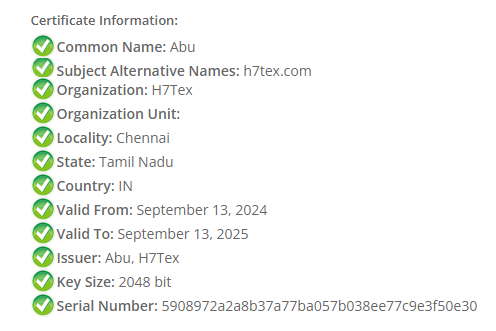
These are the decoded contents of the certificate. The “Valid From” field is important so just keep that in the back of your mind. Now I open the exploit file and see some code written which is like below:
import time
import random
from Crypto.Cipher import AES
from Crypto.Util.Padding import pad
flag = b’REDACTED’
timestamp = int(time.time())
random.seed(timestamp)
key = bytes([random.randint(0, 255) for _ in range(16)])
cipher = AES.new(key, AES.MODE_ECB)
ciphertext = cipher.encrypt(pad(flag, 16))
print(f“Ciphertext: {ciphertext.hex()}”)
What this code is doing is basically encrypting the flag using the timestamp of the time when the code is run as the seed for the random numbers that are generated afterwards and it’s encrypted in ECB mode so no IV is required. And the ciphertext file basically contains the ciphertext. Now I didn’t care much about the details in the certificate, but instead wrote a script in python for bruteforcing the timestamps and I think it works. It takes longer to run than the original intended time but yea it surely does work. I ran it for the full time from May to July (so dumb of me) but yes if you run it for the month of September, you are sure to get the flag in under 5 mins given you have good hardware and computation resources.
import time
import random
from Cryptodome.Cipher import AES
from Cryptodome.Util.Padding import unpad
from concurrent.futures import ThreadPoolExecutor
Provided ciphertext from the original script
ciphertext_hex = “3623a842948087c389b66d45226da8643f12a9372cca6b1ffd4dea706e4e5cdd08ed7ab059823236106c1e4c92a8b80e”
ciphertext = bytes.fromhex(ciphertext_hex)
Define the range of timestamps
start_timestamp = int(time.mktime(time.strptime(“2024-09-12 00:00:00”, “%Y-%m-%d %H:%M:%S”)))
end_timestamp = int(time.mktime(time.strptime(“2024-09-16 00:00:00”, “%Y-%m-%d %H:%M:%S”)))
Function to attempt decrypting with a given timestamp
def attempt_decrypt(timestamp):
random.seed(timestamp)
key = bytes([random.randint(0, 255) for _ in range(16)])
cipher = AES.new(key, AES.MODE_ECB)
try:
decrypted = cipher.decrypt(ciphertext)
unpadded_decrypted = unpad(decrypted, AES.block_size)
return timestamp, unpadded_decrypted
except (ValueError, KeyError):
return None
Function to check if decrypted flag matches the expected format
def check_flag(timestamp, decrypted):
if decrypted.startswith(b’H7CTF{’): # Adjust the prefix based on your needs
return timestamp, decrypted.decode(‘utf-8’)
return None
Brute-force through all timestamps using threading
with ThreadPoolExecutor(max_workers=10) as executor:
futures = {executor.submit(attempt_decrypt, timestamp): timestamp for timestamp in
range(start_timestamp, end_timestamp + 1)}
for future in futures:
    result = future.result()
    if result:
        timestamp, decrypted_flag = result
        flag_check = check_flag(timestamp, decrypted_flag)
        if flag_check:
            print(f"Found key for timestamp {flag_check[0]}: {flag_check[1]}")
            break
This is my code for bruteforcing and to run the script even faster just for checking purposes, just run it for the date of 14th September and you will get the flag. I’m not providing the flag, run the script for yourself.
Reversing
- Eich:
Description:
“Technology is only as good as the people behind it” — Brendan Eich
Files: shutthefrontdoor, trap
Solution:
Opening the shutthefrontdoor file gives you some weird cryptic code. Now you should identify that it’s jsfuck obfuscated code and you need to deobfuscate it using this website:
JSFuck de-obfuscator JSFuck decoder, de-obfuscatorenkhee-osiris.github.iohttps://enkhee-osiris.github.io/Decoder-JSFuck/")[](https://enkhee-osiris.github.io/Decoder-JSFuck/)

This is the decoded code you get once you decode it using the website given.
function A(D, length) { let key = ‘’; for (let i = 0; i < length; i++) { key += D.charAt(i % D.length); } return key; } function B(F, D) { let key = A(D, F.length); let G = ‘’; for (let i = 0; i < F.length; i++) { let charCode = F.charCodeAt(i); let keyCode = key.charCodeAt(i); let GChar = String.fromCharCode(charCode ^ keyCode); G += GChar; } return G; } const fs = require(‘fs’); let C = fs.readFileSync(‘C.txt’, ‘utf8’); let D = “6aef677b2c8b645384e713aece4322b045a79f48”; let E = B(C, D); console.log(“Reward: “, E); // b3BlbnlvdXJleWVzYW5kbG9va2F0dGhlbWtleXNwcm9wZXJseQ==
Use jsbeautifier to make the code more readable. Completely optional
Online JavaScript beautifier *Chrome, in case the built-in CSS and javascript formatting isn’t enough for you: - Quick source viewer by Tomi…*beautifier.iohttps://beautifier.io/")[](https://beautifier.io/)
This is the beautified code:
function A(D, length) {
let key = ‘’;
for (let i = 0; i < length; i++) {
key += D.charAt(i % D.length);
}
return key;
}
function B(F, D) {
let key = A(D, F.length);
let G = ‘’;
for (let i = 0; i < F.length; i++) {
let charCode = F.charCodeAt(i);
let keyCode = key.charCodeAt(i);
let GChar = String.fromCharCode(charCode ^ keyCode);
G += GChar;
}
return G;
}
const fs = require(‘fs’);
let C = fs.readFileSync(‘C.txt’, ‘utf8’);
let D = “6aef677b2c8b645384e713aece4322b045a79f48”;
let E = B(C, D);
console.log(“Reward: “, E); // b3BlbnlvdXJleWVzYW5kbG9va2F0dGhlbWtleXNwcm9wZXJseQ==
You would see a base64 encoded string but it doesn’t provide much of a hint except just a phrase.
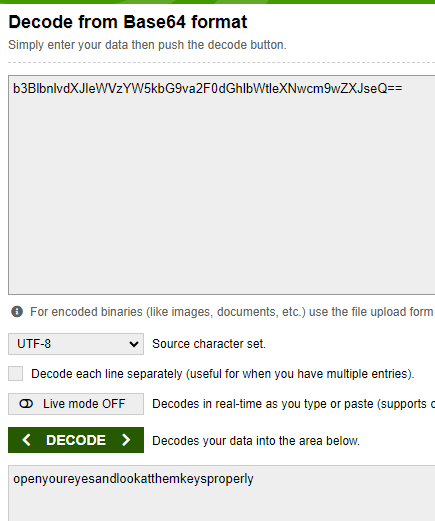
Now if you analyze the javascript code, you would realise that it is performing basic xor encryption on the flag which is stored in the C.txt file. Or you could interpret this code as the decryption code and could read it as the code is reading the ciphertext from C.txt file and decoding it using xor and printing the flag. Either way works because xor is a symmetric key encryption method which means that doesn’t matter if you’re encrypting or decrypting, the key will be the same and does not change.
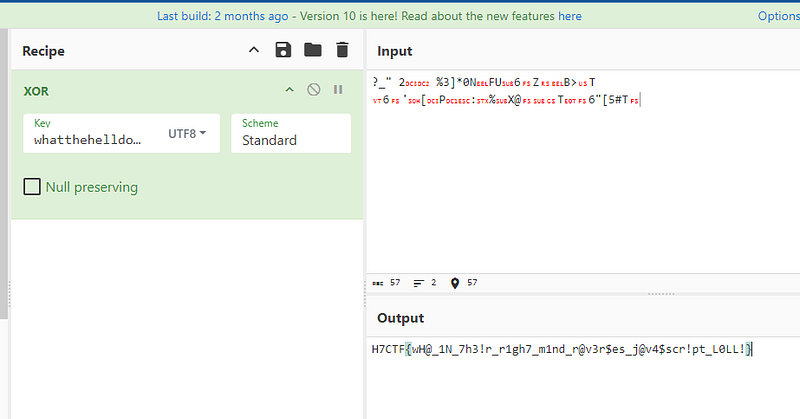
At first instinct you would think that the value of the variable D is the key but jokes at you, it’s not! It is the key but at the same time not the key. And yea by the way, the contents of the trap file are the ciphertext. If you use the value stored in the variable D as the key you would get gibberish and not the flag. So where do we go from here? My teammate Raviel figured out that, if you put in the key in any hash identifier, you would notice that it’s a sha-1 hash and if you use crackstation to crack this sha-1 hash, you would get the plaintext which is whatthehelldoyouthinkyouaredoing
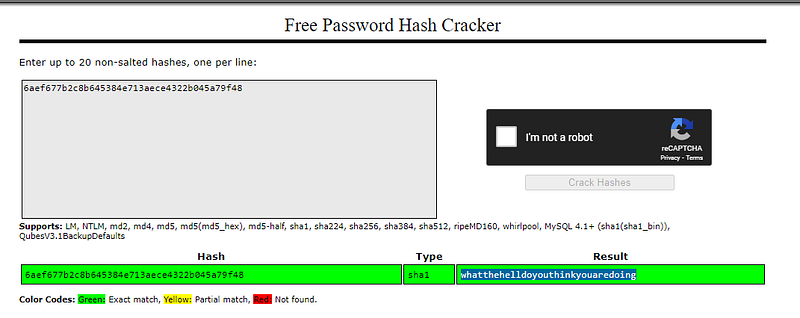
Now using this as the key for xor decryption you would get the flag! I used cyberchef for this:
2. Scrambled Pathways:
Description:
In this challenge, characters follow a hidden pattern as they traverse columns. Figure out how to untangle the message and reveal the flag!
Files: chall1, out.txt
Solution:
This is a reversing challenge so at first I open the given binary in notepad to find any low-hanging flags like the flag in plaintext present but find nothing. Then I use this online website (dogbolt.org) to decompile the binary and get the decompiled code and logic of the binary’s working. This is the decompiled code of the binary:
void _init()
{
if (gmon_start != 0)
gmon_start();
}
int64_t sub_1020()
{
int64_t var_8 = 0;
/* jump -> nullptr */
}
int64_t sub_1030()
{
int64_t var_8 = 0;
/* tailcall */
return sub_1020();
}
int64_t sub_1040()
{
int64_t var_8 = 1;
/* tailcall */
return sub_1020();
}
int64_t sub_1050()
{
int64_t var_8 = 2;
/* tailcall */
return sub_1020();
}
int64_t sub_1060()
{
int64_t var_8 = 3;
/* tailcall */
return sub_1020();
}
int64_t sub_1070()
{
int64_t var_8 = 4;
/* tailcall */
return sub_1020();
}
void __cxa_finalize(void* d)
{
/* tailcall */
return __cxa_finalize(d);
}
uint64_t strlen(char const* arg1)
{
/* tailcall */
return strlen(arg1);
}
void __stack_chk_fail() __noreturn
{
/* tailcall */
return __stack_chk_fail();
}
int32_t printf(char const* format, …)
{
/* tailcall */
return printf();
}
int32_t __isoc99_scanf(char const* format, …)
{
/* tailcall */
return __isoc99_scanf();
}
char* strcat(char* arg1, char const* arg2)
{
/* tailcall */
return strcat(arg1, arg2);
}
void _start(int64_t arg1, int64_t arg2, void (* arg3)()) __noreturn
{
int64_t stack_end_1;
int64_t stack_end = stack_end_1;
__libc_start_main(main, __return_addr, &ubp_av, nullptr, nullptr, arg3, &stack_end);
/* no return */
}
void deregister_tm_clones()
{
return;
}
void register_tm_clones()
{
return;
}
void __do_global_dtors_aux()
{
if (TMC_END != 0)
return;
if (__cxa_finalize != 0)
    __cxa_finalize(__dso_handle);

deregister_tm_clones();
__TMC_END__ = 1;
}
void frame_dummy()
{
/* tailcall */
return register_tm_clones();
}
int32_t main(int32_t argc, char** argv, char** envp)
{
void* fsbase;
int64_t rax = *(fsbase + 0x28);
int64_t s;
__builtin_memset(&s, 0, 0x96);
printf(“Input: “);
void var_78;
__isoc99_scanf(&data_200c, &var_78);
int32_t rax_3 = strlen(&var_78);
for (int32_t i = 0; i < 3; i += 1)
{
    for (int32_t j = i; j < rax_3; j += 3)
    {
        int32_t rax_12 = strlen(((i * 0x32) + &s));
        int64_t __saved_rbp;
        *((((i * 0x32) + &__saved_rbp) + rax_12) - 0x150) = *(&var_78 + j);
        *((((i * 0x32) + &__saved_rbp) + (rax_12 + 1)) - 0x150) = 0;
    }
}

int64_t s_1;
__builtin_memset(&s_1, 0, 0x32);

for (int32_t i_1 = 0; i_1 < 3; i_1 += 1)
    strcat(&s_1, (&s + (i_1 * 0x32)));

printf("Output: %s\n", &s_1);
*(fsbase + 0x28);

if (rax == *(fsbase + 0x28))
    return 0;

__stack_chk_fail();
/* no return */
}
int64_t _fini() __pure
{
return;
}
We should only focus on the “main” function as no other function is that important and are normal C++ code functions. So the main function is doing the following:
Input Handling: The program takes user input and calculates its length.
- Splitting the String: It splits the input into three parts:
- The first part contains every third character starting from index 0 (
0, 3, 6, ...). - The second part contains every third character starting from index 1 (
1, 4, 7, ...). - The third part contains every third character starting from index 2 (
2, 5, 8, ...). - Concatenation: The three parts are concatenated back together in order.
- Output: The final rearranged string is printed.
Now this shows that it is basically a tranposition cipher and you can write a python code for decoding this tranposition cipher. Below is the python code I used for decryption:
def decode_transposition_cipher(encoded_text):
# Determine the length of each segment
length = len(encoded_text)
part_size = (length + 2) // 3 # Dividing length into three parts, rounding up if necessary
# Split the encoded string into three parts
part1 = encoded_text[:part_size]
part2 = encoded_text[part_size:2 * part_size]
part3 = encoded_text[2 * part_size:]

# Reconstruct the original message
decoded_text = []
for i in range(part_size):
    if i < len(part1):
        decoded_text.append(part1[i])
    if i < len(part2):
        decoded_text.append(part2[i])
    if i < len(part3):
        decoded_text.append(part3[i])

return ''.join(decoded_text)
Example usage
encoded = “HT859092947c87F4cff7727181C{872a2ba640}” # Output from the program’s logic
decoded = decode_transposition_cipher(encoded)
print(“Decoded:”, decoded)
3. Exponential Enigma:
Description:
In this challenge, exponential sequences hold the key to unlocking an encoded message. Follow the power trail to figure out how the message has been transformed, and reveal the flag!
Files: chall2, out2.txt
Solution:
Like the previous chall, you don’t find anything when opening the binary in notepad or using strings command on it, so I again go the dogbolt.org for getting the decompiled code. And the decompiled code looks like the following:
void _init()
{
if (gmon_start != 0)
gmon_start();
}
int64_t sub_1020()
{
int64_t var_8 = 0;
/* jump -> nullptr */
}
int64_t sub_1030()
{
int64_t var_8 = 0;
/* tailcall */
return sub_1020();
}
int64_t sub_1040()
{
int64_t var_8 = 1;
/* tailcall */
return sub_1020();
}
int64_t sub_1050()
{
int64_t var_8 = 2;
/* tailcall */
return sub_1020();
}
int64_t sub_1060()
{
int64_t var_8 = 3;
/* tailcall */
return sub_1020();
}
int64_t sub_1070()
{
int64_t var_8 = 4;
/* tailcall */
return sub_1020();
}
void __cxa_finalize(void* d)
{
/* tailcall */
return __cxa_finalize(d);
}
int32_t putchar(int32_t c)
{
/* tailcall */
return putchar(c);
}
double pow(double x, double y)
{
/* tailcall */
return pow(x, y);
}
uint64_t strlen(char const* arg1)
{
/* tailcall */
return strlen(arg1);
}
void __stack_chk_fail() __noreturn
{
/* tailcall */
return __stack_chk_fail();
}
int32_t printf(char const* format, …)
{
/* tailcall */
return printf();
}
void _start(int64_t arg1, int64_t arg2, void (* arg3)()) __noreturn
{
int64_t stack_end_1;
int64_t stack_end = stack_end_1;
__libc_start_main(main, __return_addr, &ubp_av, nullptr, nullptr, arg3, &stack_end);
/* no return */
}
void deregister_tm_clones()
{
return;
}
void register_tm_clones()
{
return;
}
void __do_global_dtors_aux()
{
if (TMC_END != 0)
return;
if (__cxa_finalize != 0)
    __cxa_finalize(__dso_handle);

deregister_tm_clones();
__TMC_END__ = 1;
}
void frame_dummy()
{
/* tailcall */
return register_tm_clones();
}
int64_t tetra(int32_t arg1, int32_t arg2)
{
int64_t result = arg1;
for (int32_t i = 0; i < (arg2 - 1); i += 1)
{
    double zmm0_1 = _ZSt3powIiyEN9__gnu_cxx11__promote_2IT_T0_NS0_9__promoteIS2_XsrSt12__is_integerIS2_E7__valueEE6__typeENS4_IS3_XsrS5_IS3_E7__valueEE6__typeEE6__typeES2_S3_(arg1, result);
    int64_t result_1;

    if (zmm0_1 >= 9.2233720368547758e+18)
        result_1 = ((zmm0_1 - 9.2233720368547758e+18) ^ 0x8000000000000000);
    else
        result_1 = zmm0_1;

    result = result_1;
}

return result;
}
int32_t main(int32_t argc, char** argv, char** envp)
{
void* fsbase;
int64_t rax = *(fsbase + 0x28);
void var_38;
for (int32_t i = 1; i <= 4; i += 1)
{
    int64_t rax_3 = tetra(2, i);
    uint64_t rdx_1 = (rax_3 / 0x13);
    *(&var_38 + ((i - 1) << 2)) = (rax_3 - ((((rdx_1 << 3) + rdx_1) * 2) + rdx_1));
}

for (int32_t i_1 = 0; i_1 <= 3; i_1 += 1)
    printf(&data_2008, *(&var_38 + (i_1 << 2)));

int32_t var_4c = 0;

while (var_4c < strlen("REDACTED"))
{
    int32_t temp0_1;
    int32_t temp1_1;
    temp0_1 = HIGHD(var_4c);
    temp1_1 = LOWD(var_4c);
    uint32_t rdx_5 = (temp0_1 >> 0x1e);
    printf(&data_2015, (*"REDACTED"[var_4c] ^ *(&var_38 + ((((temp1_1 + rdx_5) & 3) - rdx_5) << 2))));
    var_4c += 1;
}

putchar(0xa);
*(fsbase + 0x28);

if (rax == *(fsbase + 0x28))
    return 0;

__stack_chk_fail();
/* no return */
}
double ZSt3powIiyEN9__gnu_cxx11__promote_2IT_T0_NS0_9__promoteIS2_XsrSt12__is_integerIS2_E7__valueEE6__typeENS4_IS3_XsrS5_IS3_E7__valueEE6__typeEE6__typeES2_S3(int32_t arg1, int64_t arg2)
{
int64_t y;
if (arg2 < 0)
{
    y = ((arg2 >> 1) | (arg2 & 1));
    y = (y + y);
}
else
    y = arg2;

return pow(arg1, y);
}
int64_t _fini() __pure
{
return;
}
There are three functions of our interest:
tetra()
_ZSt3powIiyEN9__gnu_cxx11__promote_2IT_T0_NS0_9__promoteIS2_XsrSt12__is_integerIS2_E7__valueEE6__typeENS4_IS3_XsrS5_IS3_E7__valueEE6__typeEE6__typeES2_S3_()
main()
Come on lets understand each one in detail:
tetra():
This function just calculates the tetration of the given number. You can google “tetration” for more information
_ZSt3powIiyEN9__gnu_cxx11__promote_2IT_T0_NS0_9__promoteIS2_XsrSt12__is_integerIS2_E7__valueEE6__typeENS4_IS3_XsrS5_IS3_E7__valueEE6__typeEE6__typeES2_S3_():
This function just has a complicated name and is basically calculating the power of the two numbers provided
main():
- First Loop:
- Runs four times (for
i = 1toi = 4). - Calls the
tetrafunction witharg1 = 2and the current loop indexi. - Each result is divided by 19 (
0x13) and the remainder is calculated using a mathematical operation. - The remainder is stored in a variable (
var_38). - Second Loop:
- Iterates four times (for
i_1 = 0toi_1 = 3). - For each iteration, it prints the values stored in
var_38using a formatted string (data_2008). - While Loop:
- Iterates over the length of the string
"REDACTED". - In each iteration, it extracts a character from
"REDACTED", XORs it with a value derived fromvar_38, and prints the result. This process obfuscates the string by XOR-ing it with a modified index.
Now using this logic I wrote a python script for decoding the given value and getting the flag. The code is below:
import binascii
import math
def tetra(arg1, arg2):
result = arg1
for i in range(arg2 - 1):
zmm0_1 = int(math.pow(arg1, result))
if zmm0_1 >= 9223372036854775808: # 9.2233720368547758e+18
result_1 = (zmm0_1 - 9223372036854775808) ^ 0x8000000000000000
else:
result_1 = zmm0_1
result = result_1
return result
Calculate var_38 based on tetra function
var_38 = []
for i in range(1, 5):
rax_3 = tetra(2, i)
rdx_1 = rax_3 // 0x13
var_38.append(rax_3 - (((rdx_1 << 3) + rdx_1) * 2 + rdx_1))
Encrypted output
encrypted_output_hex = “4a335351447f273d6461726637312164336222303b35213667302835376271343a37753530306d”
encrypted_output = binascii.unhexlify(encrypted_output_hex)
Decrypting the output
decrypted_output = []
for i in range(len(encrypted_output)):
xor_value = var_38[i % len(var_38)] # Cycle through var_38
decrypted_char = encrypted_output[i] ^ (xor_value & 0xFF) # XOR with the byte of var_38
decrypted_output.append(chr(decrypted_char))
Join the decrypted characters to form the final output string
decrypted_string = ‘’.join(decrypted_output)
print(“Decrypted Output:”, decrypted_string)
4. Horcrux:
Description:
“Yer a wizard Harry” ― Rubeus Hagrid
Files: Horcrux
Solution:
Using the same approach, I put the file in dogbolt.org and get the decompiled code. This time the code is even more complicated. The decompiled code is given below:
void _init()
{
if (gmon_start != 0)
gmon_start();
}
int64_t sub_1020()
{
int64_t var_8 = data_3ff0;
/* jump -> data_3ff8 */
}
char* strcpy(char* arg1, char const* arg2)
{
/* tailcall */
return strcpy(arg1, arg2);
}
int64_t sub_1036()
{
int64_t var_8 = 0;
/* tailcall */
return sub_1020();
}
int32_t toupper(int32_t c)
{
/* tailcall */
return toupper(c);
}
int64_t sub_1046()
{
int64_t var_8 = 1;
/* tailcall */
return sub_1020();
}
uint64_t strlen(char const* arg1)
{
/* tailcall */
return strlen(arg1);
}
int64_t sub_1056()
{
int64_t var_8 = 2;
/* tailcall */
return sub_1020();
}
char* strchr(char const* arg1, int32_t arg2)
{
/* tailcall */
return strchr(arg1, arg2);
}
int64_t sub_1066()
{
int64_t var_8 = 3;
/* tailcall */
return sub_1020();
}
int32_t printf(char const* format, …)
{
/* tailcall */
return printf();
}
int64_t sub_1076()
{
int64_t var_8 = 4;
/* tailcall */
return sub_1020();
}
uint16_t** __ctype_b_loc()
{
/* tailcall */
return __ctype_b_loc();
}
int64_t sub_1086()
{
int64_t var_8 = 5;
/* tailcall */
return sub_1020();
}
void __cxa_finalize(void* d)
{
/* tailcall */
return __cxa_finalize(d);
}
void _start(int64_t arg1, int64_t arg2, void (* arg3)()) __noreturn
{
int64_t stack_end_1;
int64_t stack_end = stack_end_1;
__libc_start_main(main, __return_addr, &ubp_av, nullptr, nullptr, arg3, &stack_end);
/* no return */
}
void deregister_tm_clones()
{
return;
}
void register_tm_clones()
{
return;
}
void __do_global_dtors_aux()
{
if (TMC_END != 0)
return;
if (__cxa_finalize != 0)
    __cxa_finalize(__dso_handle);

deregister_tm_clones();
__TMC_END__ = 1;
}
void frame_dummy()
{
/* tailcall */
return register_tm_clones();
}
int64_t RowenaRawenclawDiadem(char* arg1, int32_t arg2)
{
char* var_20 = arg1;
char result;
while (true)
{
    result = *var_20;

    if (result == 0)
        break;

    if ((*var_20 > 0x40 && *var_20 <= 0x5a))
    {
    label_11d9:
        char rax_13;

        if ((*var_20 <= 0x40 || *var_20 > 0x5a))
            rax_13 = 0x61;
        else
            rax_13 = 0x41;

        *var_20 = (rax_13 + ((((*var_20 - rax_13) - arg2) + 0x1a) % 0x1a));
    }
    else if ((*var_20 > 0x60 && *var_20 <= 0x7a))
        goto label_11d9;

    var_20 = &var_20[1];
}

return result;
}
char* MarvoloGauntRing(char* arg1, int64_t arg2)
{
uint64_t rax_1 = strlen(arg1);
void* var_10 = nullptr;
void* var_18 = nullptr;
while (var_10 < rax_1)
{
    char var_2c;

    for (int32_t i = 0; i <= 3; i += 1)
    {
        char rdx_3;

        if (*(var_10 + arg1) == 0x3d)
            rdx_3 = 0;
        else
            rdx_3 = (strchr("ABCDEFGHIJKLMNOPQRSTUVWXYZabcdef…", *(var_10 + arg1)) - 0x20);

        &var_2c[i] = rdx_3;
        var_10 += 1;
    }

    uint8_t var_2b;
    uint8_t var_2f = ((var_2b >> 4) | (var_2c << 2));
    uint8_t var_2a;
    uint8_t var_2e_1 = ((var_2a >> 2) | (var_2b << 4));
    char var_29;
    char var_2d_1 = (var_29 | (var_2a << 6));

    for (int32_t i_1 = 0; i_1 <= 2; i_1 += 1)
    {
        if (rax_1 < var_10)
            break;

        if ((var_10 == rax_1 && ((rax_1 - var_10) & 3) < i_1))
            break;

        void* rax_30 = var_18;
        var_18 = (rax_30 + 1);
        *(rax_30 + arg2) = &var_2f[i_1];
    }
}

char* result = (var_18 + arg2);
*result = 0;
return result;
}
int64_t Nagini(char* arg1, char arg2)
{
char* var_10 = arg1;
char result;
while (true)
{
    result = *var_10;

    if (result == 0)
        break;

    *var_10 ^= arg2;
    var_10 = &var_10[1];
}

return result;
}
char* SlytherinLocket(char* arg1, int32_t arg2)
{
int32_t rax_1 = strlen(arg1);
int64_t var_30 = ((rax_1 + 1) - 1);
void var_58;
void* rsp = (&var_58 - ((COMBINE(0, ((rax_1 + 1) + 0xf)) / 0x10) * 0x10));
int32_t var_1c = 0;
for (int32_t i = 0; i < arg2; i += 1)
{
    int32_t rax_14 = (i * 2);

    for (int32_t j = i; j < rax_1; j += ((arg2 - 1) * 2))
    {
        int32_t rax_16 = var_1c;
        var_1c = (rax_16 + 1);
        *(rsp + j) = arg1[rax_16];

        if ((i != 0 && (i != (arg2 - 1) && rax_1 > (rax_14 + j))))
        {
            int32_t rax_25 = var_1c;
            var_1c = (rax_25 + 1);
            *(rsp + (j + rax_14)) = arg1[rax_25];
        }
    }
}

*(rsp + rax_1) = 0;
return strcpy(arg1, rsp);
}
int32_t HufflepuffCup(char* arg1)
{
int32_t rax_1 = strlen(arg1);
int32_t var_c = 0;
int32_t result;
while (true)
{
    result = ((rax_1 + (rax_1 >> 0x1f)) >> 1);

    if (var_c >= result)
        break;

    char rax_5 = arg1[var_c];
    arg1[var_c] = arg1[((rax_1 - 1) - var_c)];
    arg1[((rax_1 - 1) - var_c)] = rax_5;
    var_c += 1;
}

return result;
}
int64_t TomRiddleDiary(char* arg1)
{
char* var_10 = arg1;
char result;
while (true)
{
    result = *var_10;

    if (result == 0)
        break;

    if ((*var_10 > 0x40 && *var_10 <= 0x5a))
        *var_10 = (((*var_10 - 0x34) % 0x1a) + 0x41);
    else if ((*var_10 > 0x60 && *var_10 <= 0x7a))
        *var_10 = (((*var_10 - 0x54) % 0x1a) + 0x61);

    var_10 = &var_10[1];
}

return result;
}
char* HarryPotter(char* arg1, char* arg2, void* arg3)
{
int32_t rax_1 = strlen(arg1);
int32_t rax_3 = strlen(arg2);
int32_t i = 0;
int32_t var_20 = 0;
for (; i < rax_1; i += 1)
{
    if ((*__ctype_b_loc()[arg1[i]] & 0x400) == 0)
        *(arg3 + i) = arg1[i];
    else
    {
        char rax_16;

        if ((*__ctype_b_loc()[arg1[i]] & 0x100) == 0)
            rax_16 = 0x61;
        else
            rax_16 = 0x41;

        *(arg3 + i) = (((((arg1[i] - rax_16) - (toupper(arg2[(var_20 % rax_3)]) - 0x41)) + 0x1a) % 0x1a) + rax_16);
        var_20 += 1;
    }
}

char* result = (arg3 + rax_1);
*result = 0;
return result;
}
int32_t main(int32_t argc, char** argv, char** envp)
{
int32_t var_f;
__builtin_strcpy(&var_f, “K7FWI{”);
int64_t var_1c;
__builtin_strcpy(&var_1c, “JW4wdyFuZ18A”);
int64_t var_26 = 0x122729262e686f2a;
int16_t var_1e = 0x14;
int32_t var_2d;
__builtin_strcpy(&var_2d, “m$43_k”);
int64_t var_39;
__builtin_strcpy(&var_39, “_gn1h7yr5ve”);
int32_t var_3f;
_builtin_strcpy(&var_3f, “0c3a”);
int64_t var_48;
__builtin_strncpy(&var_48, “$0yeev!}”, 9);
RowenaRawenclawDiadem(&var_f, 3);
void var_88;
MarvoloGauntRing(&var_1c, &var_88);
Nagini(&var_26, 0x4b);
SlytherinLocket(&var_2d, 3);
HufflepuffCup(&var_39);
TomRiddleDiary(&var_3f);
void var_c8;
HarryPotter(&var_48, “ENCRYPT”, &var_c8);
printf(“Collect All 7 Horcruxs to save P…”);
return 0;
}
int64_t _fini() __pure
{
return;
}
Here is what each function is doing:
**RowenaRawenclawDiadem** – Caesar Cipher
**MarvoloGauntRing** – Base64 Decoding
**Nagini** – XOR Cipher
**SlytherinLocket** – Transposition Cipher
**HufflepuffCup** – String Reversal
**TomRiddleDiary** – Caesar Cipher (with different shifts for uppercase and lowercase letters)
**HarryPotter** – Vigenère Cipher
And the main function is essentially implementing each of the functions on some encrypted strings. So using those encrypted strings from the decompiled code, you can write a python script for decrypting everything and put the flag together. Here is my code for doing that:
import base64
Caesar Cipher (RowenaRawenclawDiadem) decryption
def caesar_cipher_decrypt(text, shift):
decrypted = []
for char in text:
if ‘A’ <= char <= ‘Z’:
decrypted.append(chr(((ord(char) - ord(‘A’) - shift) % 26) + ord(‘A’)))
elif ‘a’ <= char <= ‘z’:
decrypted.append(chr(((ord(char) - ord(‘a’) - shift) % 26) + ord(‘a’)))
else:
decrypted.append(char)
return ‘’.join(decrypted)
Base64 decoding (MarvoloGauntRing)
def base64_decode(text):
return base64.b64decode(text).decode(‘utf-8’)
XOR Cipher decryption (Nagini)
def xor_decrypt(text, key):
return ‘’.join([chr(ord(char) ^ key) for char in text])
Transposition Cipher decryption (SlytherinLocket)
def transposition_decrypt(text, key):
# Based on transposition logic, reverse process is needed here
num_rows = key
num_cols = len(text) // key
grid = [‘’] * num_cols
col = 0
row = 0
for char in text:
    grid[col] += char
    col += 1
    if col == num_cols or (col == num_cols - 1 and row >= len(text) % key):
        col = 0
        row += 1

return ''.join(grid)
String Reversal (HufflepuffCup)
def reverse_string(text):
return text[::-1]
Modified Caesar Cipher (TomRiddleDiary)
def modified_caesar_decrypt(text):
decrypted = []
for char in text:
if ‘A’ <= char <= ‘Z’:
decrypted.append(chr(((ord(char) - 0x34) % 26) + ord(‘A’)))
elif ‘a’ <= char <= ‘z’:
decrypted.append(chr(((ord(char) - 0x54) % 26) + ord(‘a’)))
else:
decrypted.append(char)
return ‘’.join(decrypted)
Vigenère Cipher decryption (HarryPotter)
def vigenere_decrypt(ciphertext, key):
decrypted = []
key_length = len(key)
key = key.upper()
for i, char in enumerate(ciphertext):
if ‘A’ <= char <= ‘Z’:
shift = ord(key[i % key_length]) - ord(‘A’)
decrypted.append(chr((ord(char) - shift - ord(‘A’)) % 26 + ord(‘A’)))
elif ‘a’ <= char <= ‘z’:
shift = ord(key[i % key_length]) - ord(‘A’)
decrypted.append(chr((ord(char) - shift - ord(‘a’)) % 26 + ord(‘a’)))
else:
decrypted.append(char)
return ‘’.join(decrypted)
Example decryption flow for each cipher
ciphertext_caesar = “K7FWI{”
ciphertext_base64 = “JW4wdyFuZ18A”
ciphertext_xor = “\x12\x27\x29\x26\x2e\x68\x6f\x2a” # Example XOR-encrypted text
ciphertext_transposition = “m$43_k”
ciphertext_reverse = “gn1h7yr5ve”
ciphertext_modified_caesar = “0c3a”
ciphertext_vigenere = “$0yeev!}”
Decrypting the horcruxes:
decrypted_caesar = caesar_cipher_decrypt(ciphertext_caesar, 3)
decrypted_base64 = base64_decode(ciphertext_base64)
decrypted_xor = xor_decrypt(ciphertext_xor, 0x4b) # Example key
decrypted_transposition = transposition_decrypt(ciphertext_transposition, 3)
decrypted_reverse = reverse_string(ciphertext_reverse)
decrypted_modified_caesar = modified_caesar_decrypt(ciphertext_modified_caesar)
decrypted_vigenere = vigenere_decrypt(ciphertext_vigenere, “ENCRYPT”)
print(“Decrypted Caesar:”, decrypted_caesar)
print(“Decrypted Base64:”, decrypted_base64)
print(“Decrypted XOR:”, decrypted_xor)
print(“Decrypted Transposition:”, decrypted_transposition)
print(“Decrypted Reverse:”, decrypted_reverse)
print(“Decrypted Modified Caesar:”, decrypted_modified_caesar)
print(“Decrypted Vigenère:”, decrypted_vigenere)
There is one problem with the challenge though, I think it was a mistake by the author. The xor output you get that is the decrypted plaintext is reversed, so you have to reverse it and then that completes the flag.
5. Bitwise Mystery
Description:
This challenge obscures the flag using a combination of bit shifts and character manipulation. Discover how the paired characters are transformed and recover the hidden message!
Files: chall3.pyc, out3.txt
Solution:
This is a really easy challenge so I might not go into alot of details. At first glance, you can use any online available pyc decompiler to decompile the python code and get the source code. So I did that and the python source code is given below:
flag = ‘REDACTED’
n = flag
c = int(input(’Enter a number: ’))
if len(n) % 2:
n += ‘*’
m = []
for i in range(0, len(n), 2):
a, b = (ord(n[i]), ord(n[i + 1]))
m.append((a << c) + b)
print(m)
The code is really simple and is not so complicated. You can make out the value of c variable using the flag format which is given and then use that c variable to decode the further of the flag. The script for doing so is given:
def find_shift_value(m):
first_value = m[0]
known_ascii_H = ord(‘H’)
known_ascii_7 = ord(‘7’)
# Subtract the ASCII of '7' from the first value in m
result = first_value - known_ascii_7

# Now find how many shifts are needed to get from 72 to result
for c in range(1, 1000000):  # Try shift values from 1 to 15
    if (known_ascii_H << c) == result:
        return c
return None
def decrypt(m, c):
decrypted = []
for item in m:
a = item >> c
b = item - (a << c)
decrypted.append(chr(a))
decrypted.append(chr(b))
# Join the decrypted characters and remove padding '*' if present
decrypted_flag = ''.join(decrypted).rstrip('*')
return decrypted_flag
Example usage
m = [322523242873603806320271688401855976049516951601789533025598430538786029449943176134846359031111424671799, 300125795451825764214697265596171533268300496629443037676598539529148110738141566681037584098395353514068, 313564263904892589478041919279582198937030369612850934885998474134930861965222532353322849058024996208763, 232933453186491637897973997179118204924651131712403551629598866500234354602736738319611259300247140040806, 223974474217780421055744228056844427812164549723464953489998910096379187118016094538087749327160711577697, 215015495249069204213514458934570650699677967734526355350398953692524019633295450756564239354074283114550, 443469458951205233690373571552551967068085808452460607910197841990830790493671867185413743667778208923745, 215015495249069204213514458934570650699677967734526355350398953692524019633295450756564239354074283114595, 219494984733424812634629343495707539255921258728995654420198931894451603375655772647325994340617497346149, 246371921639558463161318650862528870593381004695811448838998801106017105829817703991896524259876782735457, 237412942670847246319088881740255093480894422706872850699398844702161938345097060210373014286790354272312, 232933453186491637897973997179118204924651131712403551629598866500234354602736738319611259300247140040806, 246371921639558463161318650862528870593381004695811448838998801106017105829817703991896524259876782735458, 241892432155202854740203766301391982037137713701342149769198822904089522087457382101134769273333568503908, 456907927404272058953718225235962632736815681435868505119597776596613541720752832857699008627407851618352, 215015495249069204213514458934570650699677967734526355350398953692524019633295450756564239354074283114550, 250851411123914071582433535423665759149624295690280747908798779307944689572178025882658279246419996966964, 438989969466849625269258686991415078511842517457991308840397863788903206751311545294651988681234994692194, 255330900608269680003548419984802647705867586684750046978598757509872273314538347773420034232963211198513, 559936185544451052639360570142111069530411374308662383724997275240947967795040236345219373317901778944042] # Replace with your encrypted values list
shift_value = find_shift_value(m)
if shift_value is not None:
print(f“Shift value found: {shift_value}”)
decrypted_flag = decrypt(m, shift_value)
print(f“Decrypted flag: {decrypted_flag}”)
else:
print(“Shift value not found!”)
The script is essentially bruteforcing the value of c and comparing it with the flag format that is provided.
WEB
- No Paste
Description:
“If you spend too much time thinking about a thing, you’ll never get it done. Paste it up, cut it out, and just do it” — Unknown
Instance: https://paste.h7tex.com/
Solution:
At first instinct you should try to bypass the input and try to input something in the input field. But none of that works. So now the next approach you should try inspecting the page to find something interesting. In the javascript code you would find a string “bypass123”. And after further reading of the javascript code you will realise that the server is essentially sending a POST request to the /submit endpoint using the input parameter and the input parameter is essentailly what we enter in the input field on the main webpage. The main webpage looks like this:
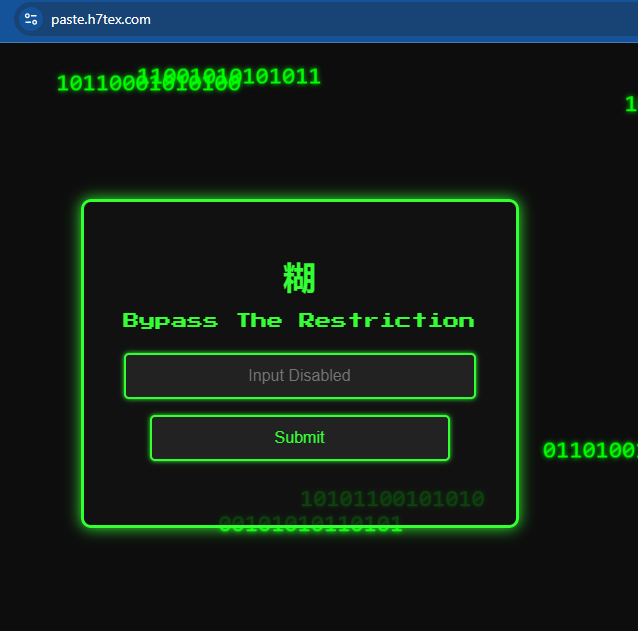
So now I did not have access to burpsuite so the next best option I had was to use the console tab in the chrome dev tools and I wrote a javascript function for making a post request to the /submit endpoint using “bypass123” as the input. This is the javascript code:
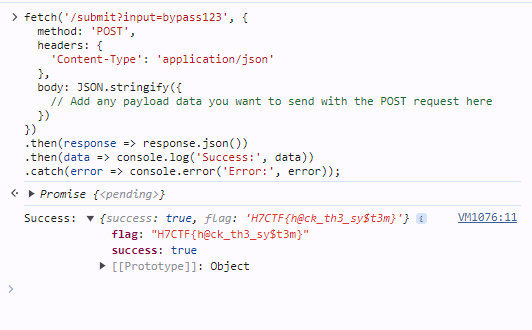
fetch(‘/submit?input=bypass123’, {
method: ‘POST’,
headers: {
‘Content-Type’: ‘application/json’
},
body: JSON.stringify({
})
})
.then(response => response.json())
.then(data => console.log(‘Success:’, data))
.catch(error => console.error(‘Error:’, error));
Hardware
- Layered Circuits
Description:
Layers conceal the flag you seek, decode the PCB to speak.
Files: Solve_it_if_you_can.zip
Solution:
You can upload the zip file directly to this website (https://www.pcbway.com/project/OnlineGerberViewer.html) and view the gerber files, so there’s no need of extracting the contents of the zip file. The board looks something like this:
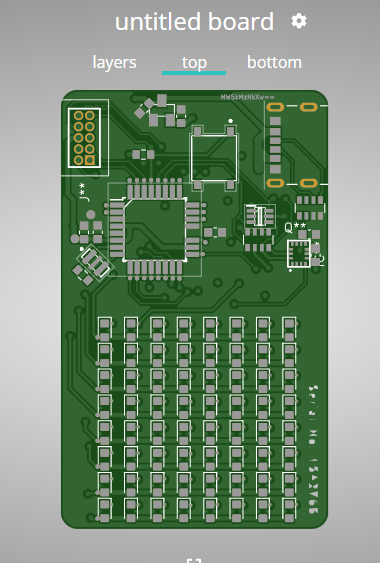
On the left side of the UI, you will find an interface like this and you can view each layer of the pcb board:

So now basically the challenge was viewing each layer and gathering the base64 encoded strings from each layer of the pcb and decoding everything and then putting everything together. Nothing much complicated.
That’s it for the writeups from my side. I hope you liked it and if you did please follow and appreciate the post. Thank you for reading. Happy Hacking!