
TryHackMe | Advent of Cyber 2022 *Get started with Cyber Security in 24 Days - learn the basics by doing a new, beginner-friendly security challenge…*tryhackme.comhttps://tryhackme.com/room/adventofcyber4")[](https://tryhackme.com/room/adventofcyber4)
So we are on to day 2 and we have to do Log Analysis. Well as always I’ll try to explain Log Analysis in a nutshell….. Here we go:
So Log Analysis (as it’s name suggests) is about analysing log files. What are log files you might ask? So Log files are files where all the events that are happening in the system are stored for example the log file of a website would usually store which device is connecting to the website, what is it’s ip, when did it connect, etc. The log file a system will contain what are the stuff happening in the system like when did wifi turn on, was there a usb-plugged in, when was it plugged-in, etc. Tryhackme has given us a very good classification of logs in a file.
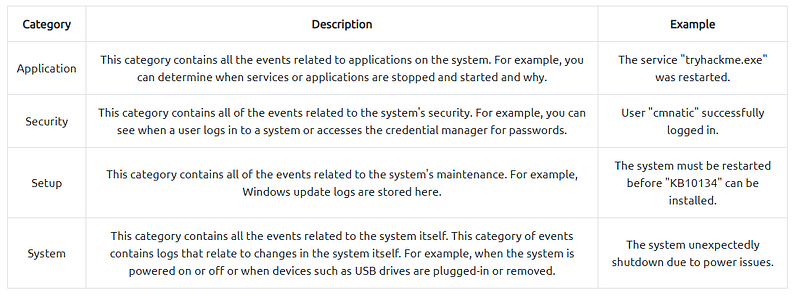
Windows Log file classification
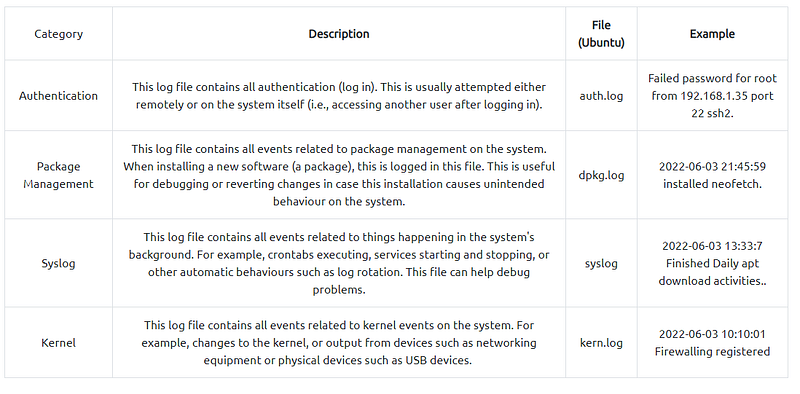
Linux Log File classfication
Viewing and Managing log is a hard thing (not for us but for the people who have huge infrastructures). There are tools like Splunk for managing and handling log files but the SIEM (Security Information and Event Managment) is very expensive and requires alot of training to use it properly. So for this challenge we will be using a built-in tool in linux that is known as grep. Grep is not meant to be used for viewing logs but instead it is used to kind of filter certain stuff from a file, like for instance you have a huge text file and have a word hidden in it, instead of searching the whole text file you can just use grep to filter that certain word from the text file. So in here we are using grep to filter certain information from a log file like account creation.
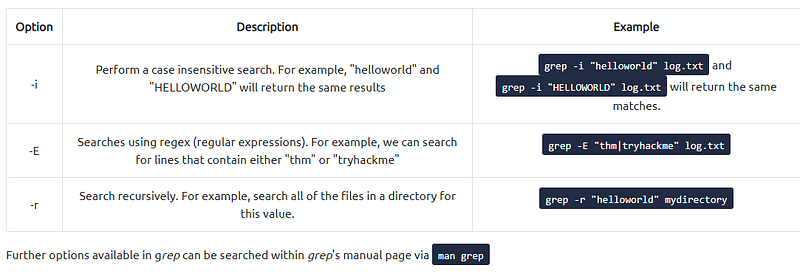
table by Tryhackme for peeps who don’t know about grep
Let’s get to the practical now. I’ll be using kali linux with ssh but if you don’t have kali linux installed you can use the VM(Virtual machine also known as attackbox) provided by Tryhackme. First start the machine by clicking the start machine button at the extreme top of the challenge (follow the split screen instructions given by Tryhackme if you are not using kali linux and want to use attackbox). For connecting with kali linux (like me) just open up a terminal and type ```ssh elfmcblue@<Machine_IP>``` and after you click enter it should prompt you for a password just enter this password tryhackme! (with the exclamation mark) after this you will get the ssh shell into the machine. The first question you can just click completed. Now the second question “how many log files are there” come on you can atleast do this one, they are telling you the command as well. If you still didn’t get this one the answer is 2. Next one “Elf McSkidy managed to capture the logs generated by the web server. What is the name of this log file?” well if you look closely

There is a file named as webserver.log and they are asking for the webserver log so that’s the answer. ooooooooooooohhhhhh now we have to investigate the logs. Alright we know how to do it because thm thought us how to do it with grep. Let’s do this!
So the next question asks us the day when Santa’s list was stolen (I was today years old when I found out Santa’s list was stolen). So now we will grep the file. Normally using cat on it gives alot of stuff from the log file. And as the picture shows I tried using ```grep “list” webserver.log” but it is also giving me alot of output and I am too lazy to look through it all (that’s the whole purpose of using grep, being lazy and filtering output). So I tried another thing ```grep -i “Santa” webserver.log``` for people wondering about the -i it’s there so that it does not restrict it to either uppercase or lowercase. and the output now is lesser when compared to the previous output.
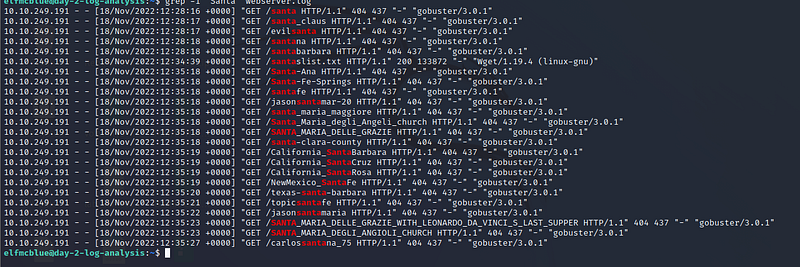
Notice how out of all the 404 responses, one response stands out? Yes that 200 response code (keep that in the back of your mind for now we will use it later). Do you notice how all responses were sent on 18th November 2022? And 18th November 2022 was a friday, so we have the answer to the 5th question. Now the next question, it’s pretty straight forward the answer is the only ip that is sending the requests so now worries with that. Next one is the thing you kept in the back of your mind…… Yes that 200 response code see the file in that response code santalist.txt Yes that is the file that was stole from Santa. Now you should try searching for the flag on your own (be creative). If you still can’t find the flag Scroll Down
So the flag is not in the webserver.log file it’s instead in the SSHD.log file and if you run ```grep “THM” SSHD.log``` you’ll get the flag.